Passwords have had a good run, but they've always been the weak link in security: reused, phished, leaked in breaches, or simply forgotten. Passkeys are the industry's answer, and adoption is accelerating fast. But "passwordless" doesn't mean "flawless." Below is a practical rundown of how passkeys actually work under the hood, the real vulnerabilities security researchers have surfaced, and step-by-step guidance for setting them up.
How Passkeys Actually Work
Passkeys are built on the FIDO2/WebAuthn standard and rely on public-key (asymmetric) cryptography rather than a shared secret like a password. Three parties are involved: the user, who proves presence via biometrics or a device PIN; the authenticator, a secure element that generates the key pair and stores the private key; and the relying party (server), which issues a random challenge and stores only the public key.
During registration, the authenticator generates a fresh key pair for that specific website. The private key never leaves the device; the public key is sent to and stored by the server. During login, the server sends a random challenge, the authenticator signs it (after the user confirms via biometric or PIN), and the server verifies that signature against the stored public key.
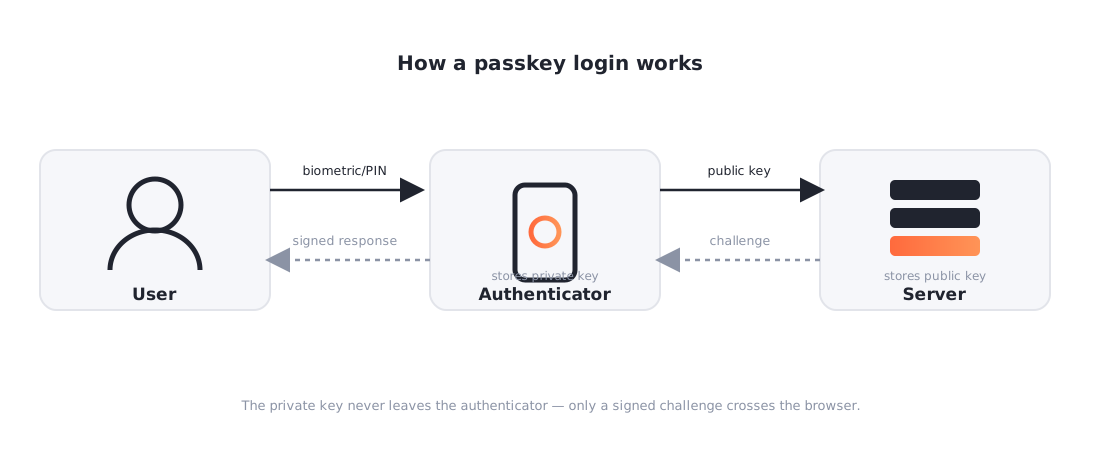
This design is genuinely strong against the attacks that plague passwords: no shared secret to steal from a database, no password to reuse across sites, and because the signature is bound to the exact origin, classic phishing pages that just display a fake login form don't work.
Device-Bound vs. Synced Passkeys
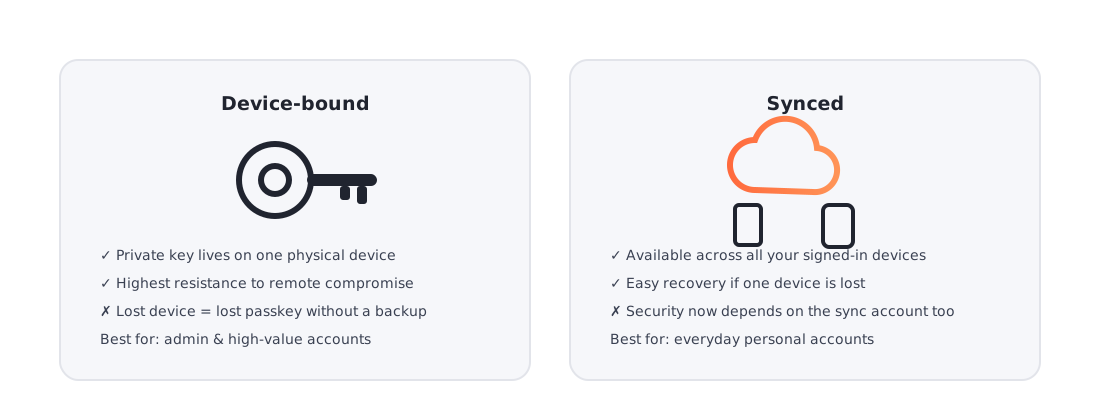
- Device-bound: the private key lives only on one physical device (e.g., a hardware security key). Highest security, less convenient if you lose the device.
- Synced: the private key is encrypted and synchronized across devices via a cloud service like iCloud Keychain, Google Password Manager, or a password manager such as 1Password or Bitwarden. Much more convenient, but it introduces a new trust dependency on the sync provider's account.
What Security Researchers Have Actually Found
- The browser is the real trust boundary. Both the authenticator and the server communicate through the browser as an intermediary — neither can independently verify the other. Researchers demonstrated an attack (dubbed "Passkeys Pwned") in which a malicious browser extension or injected script intercepts the WebAuthn registration flow, silently creating a passkey the attacker controls rather than the legitimate user. This doesn't steal an existing passkey's private key — the cryptography itself isn't broken — but it can trick a user into registering a fraudulent passkey during a forced re-registration flow.
- Falsifiable prompts, not broken crypto. Separate research showed that "phishing-resistant" passkey prompts can be spoofed in real time through UI manipulation, tricking users into approving a login they didn't intend. The underlying FIDO2 algorithms weren't broken — the weak point was the user-facing prompt.
- Synced passkeys widen the blast radius. Academic research comparing device-bound versus synced credentials found synced passkeys meaningfully less secure, since compromising the sync account can expose every passkey tied to it.
- No breach-check mechanism exists yet. Unlike passwords, there's currently no standardized way to know if a passkey has been silently compromised at registration.
- Account recovery is still the soft underbelly. Almost every implementation still needs a fallback (password, SMS code, recovery key), and that fallback is frequently the weakest link in the entire chain.
It's worth noting mainstream security commentators pushed back on some of the more alarmist framing of these findings — the FIDO2 cryptography itself remains unbroken. The honest takeaway: passkeys shift the attack surface from "guess or steal a password" to "compromise the browser, the sync account, or the recovery flow" — a real improvement, but not a silver bullet.
Practical Mitigations
- Enforce managed/vetted browser extensions on corporate devices; audit continuously, not just at install time.
- For high-value or admin accounts, prefer device-bound hardware keys over synced passkeys.
- Harden account recovery flows — require additional verification before a new passkey can be registered, and alert users when one is added.
- Keep browsers and OS-level authenticators fully patched.
- Combine passkeys with conditional access policies rather than treating them as a standalone control.
How to Configure Passkeys — As an End User
- Check the site supports passkeys — look for "Sign in with a passkey" under account/security settings.
- Start registration from the account security page (Google, Microsoft, Apple ID, GitHub, etc.).
- Choose where to store it: your device's built-in authenticator, or a physical security key.
- Confirm with biometrics or PIN when prompted — this creates the key pair and registers the public key.
- Add a backup method: a second passkey on another device, or a physical security key as fallback.
- Review existing passkeys periodically and remove any you no longer recognize.
How to Configure Passkeys — In Microsoft 365 / Entra ID
- In the Microsoft Entra admin center: Protection > Authentication methods > Policies, enable Passkey (FIDO2) as an allowed method.
- Configure key restrictions to limit registration to approved hardware key models (AAGUIDs) if you want device-bound-only policies.
- Decide whether to allow passkeys in Microsoft Authenticator (synced, phone-based) in addition to hardware keys.
- Roll out via Conditional Access, requiring phishing-resistant authentication for admin roles or sensitive apps.
- Communicate a clear registration and recovery process to end users — this is where most support tickets, and most real-world risk, will concentrate.
- Monitor sign-in logs for unexpected new passkey registrations, especially on privileged accounts.
Bottom Line
Passkeys are a genuine, measurable improvement over passwords — phishing pages that steal credentials simply don't work against them the way they do against passwords. But "passwordless" isn't "riskless": the browser, the sync/cloud account, and the account recovery flow are now where attackers will focus. Rolling out passkeys well means paying as much attention to those three areas as to the passkey technology itself.